How to sign up for HeadsUp
Create your free HeadsUp account with your name, email and a password, then confirm it with the code we email you.
A HeadsUp account is what you plan, send and track your events from. It’s free to make, and the Free plan needs no card. Only hosts need an account. Your guests never do.
-
Go to headsup.rsvp and tap Sign up free. You can also go straight to headsup.rsvp/signup.
-
Type Your name, your Email and a Password. Your password needs at least 12 characters, with an uppercase letter, a lowercase letter and a number.
-
Finish the quick robot check if one shows up, then tap Create my account.
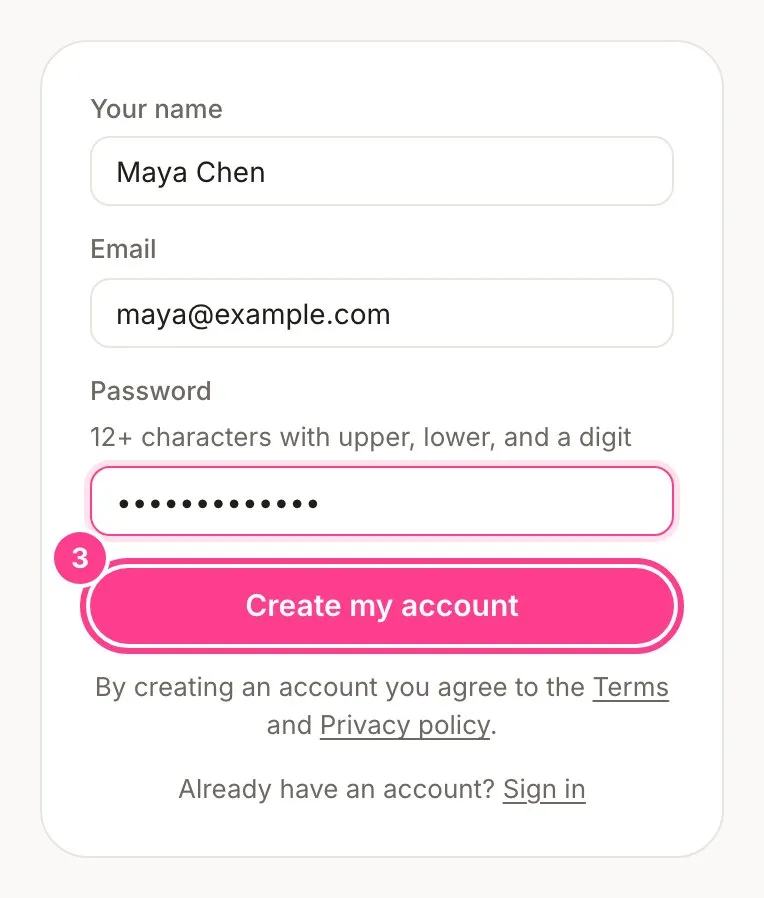
-
Check your inbox. We email you a 6-digit code. Type it into 6-digit code and tap Confirm and sign in.
That’s it. You land on your Events home, ready to create your first event.
Good to know
- No code in your inbox? Check your spam folder, or tap Resend the code.
- Got an invite link from a friend? Open it and sign up the same way. It works once and lasts two weeks.
- Want a look before you sign up? Try the editor without an account. What you build comes with you when you join.
- HeadsUp is starting with Australian events. Signing up from outside Australia shows a note saying so, with a way to hear when we reach you. Hosting an Australian event from overseas? Tap Hosting an Australian event? Continue to sign up.
- Already have an account? Tap Sign in at the bottom of the form instead.
- By creating an account you agree to the Terms and Privacy policy.
Didn't answer it?
Tell us what you were trying to do and we'll write back, or give our guide to your AI assistant and ask it.