Email vs SMS for scheduled invites
Pick email for detailed invites and SMS for fast replies; both link to the same invite page.
If guests need detail, send email. If you want a fast reply, send SMS. On HeadsUp, both options send guests to the same invite page, so the main choice is how much you need to say up front and how soon you want people to see it.
You’re choosing between two simple paths:
- Scheduled email suits invites with more context, like dress code, parking, travel notes, or work event details
- Scheduled SMS suits short invites, casual events, follow-ups, and last-minute updates
- Email may sit in an inbox until the next check
- SMS often gets seen soon after it lands on a phone
- HeadsUp SMS only supports Australian mobile numbers for now
- Scheduled sending for both email and SMS is only on paid plans
- Text packs can still be bought on any plan, including Free
- Guests don’t reply by text, they use their personal HeadsUp invite link instead
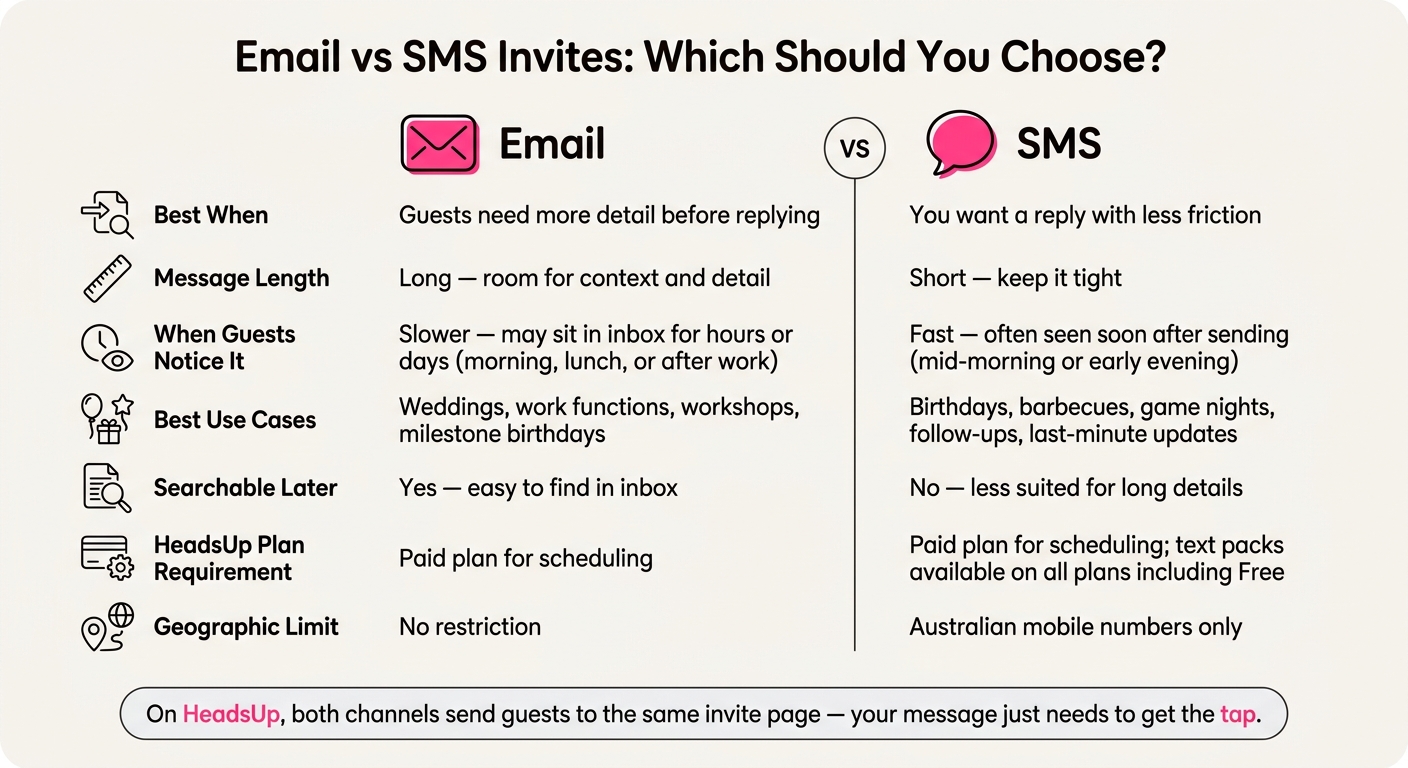
Email vs SMS Invites: Which Should You Choose?
Quick comparison
| What you’re comparing | SMS | |
|---|---|---|
| Best when | Guests need more detail before replying | You want a reply with less friction |
| Message length | More room to explain | Short and direct |
| When people tend to notice it | Next inbox check, often morning, lunch, or after work | Often soon after delivery, often mid-morning or early evening |
| Good fit for | Weddings, work functions, workshops, milestone birthdays | Birthdays, barbecues, game nights, follow-ups, last-minute updates |
| Search later | Easy to find in an inbox | Less suited for long details |
| HeadsUp limits | Paid-plan feature for scheduling | Paid-plan feature for scheduling, Australian mobile numbers only |
The short version: pick email when context comes first, pick SMS when action comes first, then let the HeadsUp invite page handle the RSVP and extra details.
Scheduled email invites: more room for detail and a slower read
Email works well for invites that need a bit more detail, like dress code, parking, or travel notes, before guests RSVP. If people need context first, email is often the better pick.
How email handles longer messages
Email gives you space to mention the venue, dress code, and travel logistics without making the message feel cramped. You can then send guests to their invite page to RSVP through HeadsUp. If you don't have a guest list yet, you can also share an open invite link to collect names and contact info.
When guests usually read a scheduled email
Scheduled email tends to get read the next time someone checks their inbox, often in the morning, at lunch, or after work. That timing matters. If your event needs a fast reply, email may feel a little slower. It helps to schedule it for the time your guests are most likely to check their inbox.
When email fits the host's goal
Email suits formal events, or any event where guests need more detail before they respond. It works well for weddings, work functions, milestone birthdays, and workshops. There’s also a practical upside, guests can search their inbox later if they need to find the date, time, or address again.
On HeadsUp, scheduled email sending is a paid-plan feature.
SMS is the better fit when speed and brevity matter more than detail.
Scheduled SMS invites: short, direct, and noticed sooner
A text is harder to miss than an email. It shows up on the lock screen and avoids inbox clutter, spam folders, and promotions tabs. SMS is a good fit when you want guests to spot the invite fast.
Why SMS works best with short wording
SMS works best when the wording is short. A clear message that says what the event is and sends guests to their personal invite link is usually enough. Dress codes, parking notes, and dietary details are better placed on the invite page.
On HeadsUp, SMS invites come from the branded HeadsUp sender ID and are one-way, so guests do not reply by text. They tap their personal link and respond on their invite page, which keeps RSVPs, dietary requirements, and questions in one place.
When guests usually notice a scheduled text
Mid-morning or early evening often works better than early morning or late at night. People are already checking their phones at those times, so the message feels well timed without being intrusive.
When SMS fits the host's goal
SMS suits casual events, birthday parties, barbecues, and game nights, or any invite where a quick RSVP matters more than extra detail. It also works well as a follow-up nudge when some guests have not replied yet, or when you need to send a last-minute update fast.
That makes the next question simple: who is receiving it, and what do you need them to do first?
On HeadsUp, scheduling SMS is a paid-plan feature. Text packs can still be bought on any plan, including Free.
Email vs SMS on HeadsUp: a side-by-side guide for hosts
If you're using scheduled sending on a paid plan, this guide helps you pick the right channel.
| Scheduled email | Scheduled SMS | |
|---|---|---|
| Message length | Long, with room for context and detail | Short, keep it tight |
| When guests notice it | Slower, may sit in an inbox for hours or days | Fast, often seen soon after sending |
| Best use cases | Weddings, workplace events, formal occasions | Birthdays, casual gatherings, quick updates |
Use the table below to pick the channel that suits your guest list and the kind of reply you want.
Match the channel to your guests and event type
Your guest list shapes the tone, but the result you want should still come first.
Colleagues and professional contacts often suit email. Close friends, family, and social groups often suit SMS. If you're inviting overseas guests, use email, because HeadsUp SMS delivery only supports Australian mobile numbers for now.
A mixed guest list is easy to handle. You can send SMS to guests with Australian mobile numbers, and email to everyone else from the same event on HeadsUp.
Match the channel to the outcome you want first
If your main goal is to give guests the full picture before they RSVP, email gives you more room to explain things clearly. If your main goal is to get a fast reply, SMS is more likely to prompt one soon.
HeadsUp does not send automatic reminders or RSVP confirmations. Any follow-up needs to be sent by you, and scheduled sending is only on a paid plan.
How the invite page changes the comparison
On HeadsUp, the channel matters less than the link your guests receive.
Your message only needs to get the tap. The invite page does the heavy lifting, handling the RSVP and any extra event details.
This matters most with SMS. Even for a more detailed event, a short message can work well because the invite page holds the information guests need.
Conclusion: pick the channel that fits the moment
Choose by two questions: how much detail guests need before they RSVP, and how fast they need to notice the invite.
Email gives you more room. It suits events where guests need a bit of context before they commit. SMS gets seen sooner. It works best when the message is short and the next step is obvious.
On HeadsUp, the link matters more than the channel. Both email and SMS send guests to the same invite page, so your message can stay brief.
Scheduled sending on HeadsUp is a paid-plan feature for both email and SMS. Text packs are available on every plan, including Free.
Pick the channel that suits the moment, then let the invite page do the heavy lifting.
FAQs
Can I use both email and SMS for one event?
Yes. Many hosts use both, email first for fuller details, then SMS for reminders or urgent updates.
On HeadsUp, scheduled sending is a paid-plan feature. SMS invites can still be used on any plan because text packs are available on every plan, including Free. Texts are one-way from the branded HeadsUp sender ID, so guests tap their link and respond on the invite page.
What if some guests don’t have an Australian mobile number?
If some guests don’t have an Australian mobile number, send their invite by email. It works well for formal events and for messages that need more detail.
Use SMS for Australian numbers when timing matters, like casual events, reminders, or late changes. On HeadsUp, scheduled sending is a paid-plan feature, and you can buy SMS on any plan.
Can I schedule follow-up messages on HeadsUp?
Yes. HeadsUp lets you schedule email or SMS invites ahead of time, and scheduled sending is a paid-plan feature.
Use email when your message needs more detail or a more formal tone. Use SMS for short, time-sensitive messages. HeadsUp texts are one-way and sent from the branded HeadsUp sender ID, so guests respond by tapping their personal link and replying on the invite page.