How to manage a guest list without the chaos
One master guest list with live RSVPs and attached notes keeps events organised and prevents last-minute chaos.

The fix is simple: keep one guest list and update it in one place. If names, invites, RSVPs, plus-ones and dietary notes sit across texts, emails and spreadsheets, you lose time and miss details.
To keep your list under control, you need to:
- start with one master list
- import contacts instead of typing them again
- track sent invites, opens and replies on each guest record
- keep plus-ones and dietary notes attached to that same record
- use search and filters to follow up with the right people
- export the final list for your venue or caterer
- keep the cleaned contact list for the next event
A guest list works best when every guest has one record, one invite link, and one place for every update. HeadsUp supports that by letting you import contacts, send personal links by SMS or email, track opens and RSVPs live, and reuse contacts across future events.
If you want less admin and fewer missed details, this is the setup to use.
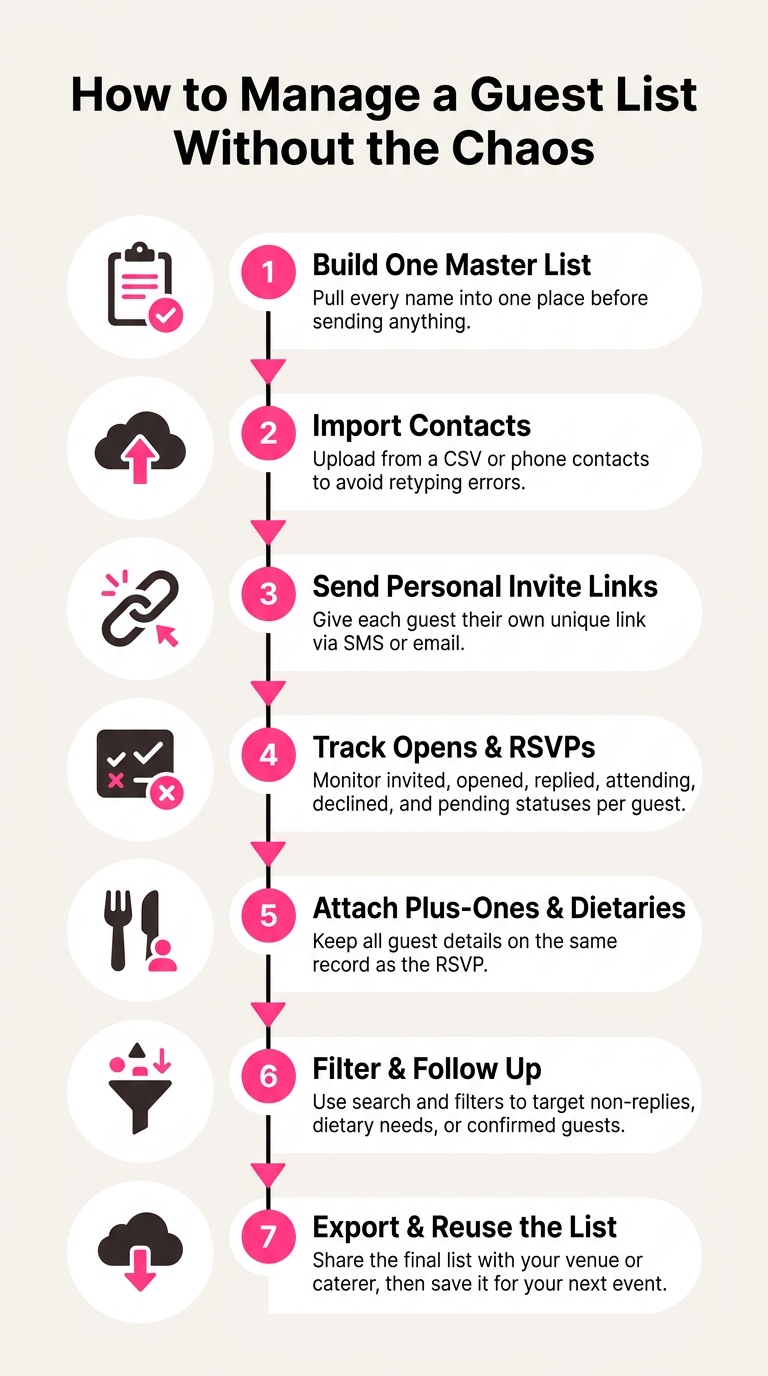
How to Manage a Guest List: 7-Step Process
Build one master list before you send anything
Start with a clean master list
Before you send anything, pull every name into one master list. Then tidy it up. Remove duplicates, fill in missing details, and make sure each guest has at least one contact method, either a mobile number or an email address.
It helps to decide early how you'll handle couples and families. You can attach partners and kids as plus-ones on one guest's record, which makes follow-up much easier later. You can also group guests by relationship, so it's simple to filter the list and chase up the right people fast.
Import existing contacts instead of retyping them
Retyping names and numbers is a simple way to create mistakes. Import them from a spreadsheet, your phone contacts, or import from your CRM instead.
On HeadsUp, you can import guests from a CSV file or your phone contacts. HeadsUp also keeps a reusable contacts directory across events, which saves time if you’re planning more than one. Keep your spreadsheet headings clear for names, mobile numbers, and email addresses. Clean data in means less fixing later.
Once your list is clean, you can track each invite as replies come in.
Track invites, opens, replies and guest details in one place
Record the full invite journey for each guest
Once invites are sent, each reply stays tied to the same guest record. You can track every guest as invited, opened, replied, attending, declined or pending.
That makes follow-up a lot easier. If someone opened the invite but hasn’t replied, you can message them differently from someone who hasn’t opened it at all. And when it’s time to check final numbers, those details are still sitting in the same place.
Keep plus-ones and dietaries attached to the guest record
Plus-ones and dietary requirements stay on the same guest record as the RSVP, so you don’t need to dig through old messages or cross-check notes later.
Give each guest their own invite link
Use one personal invite link for each guest, so every RSVP updates the same record.
With HeadsUp, each guest gets their own personal link by SMS, email, or direct share in a chat app. SMS invites are sent from the branded HeadsUp sender ID. Guests tap their link and reply on their invite page. A live dashboard tracks opens, RSVPs and dietary tallies in real time. Once each response lands on the right record, search and filters make final follow-up much faster.
Keep the list under control as the event gets closer
Once the invites are out, the job changes. Now it’s about keeping the list up to date. Replies come in bit by bit, plus-one names get swapped, and sometimes a guest goes quiet. What helps most is knowing where each guest stands at any moment.
Use search and filters to find the right guests fast
With a big guest list, scrolling for one person is a pain. Search gets you straight to a guest by name. Filters let you pull up the exact group you need, like guests who haven’t replied, people with dietary requirements, or confirmed attendees only.
That makes final follow-up easier and helps keep your headcount current.
Follow up based on what guests have actually done
Not every non-reply means the same thing. A guest who opened the invite but hasn’t replied yet is different from someone who never opened it at all. One may just need a gentle nudge. The other may have the wrong email address, or the text may not have landed. Use the open status and RSVP status to follow up in the right way.
Export the final list when you need to share it
Once the replies are in, you may need to pass the list on to a caterer, a venue coordinator, or someone else helping on the day. Export confirmed guests, dietaries, and plus-ones for a clean handoff.
A basic guest list export is on every plan. Business plans add the full delivery and attribution export, see headsup.rsvp/pricing.
Once that handoff is done, keep the cleaned list for next time.
Reuse the guest list for your next event
Turn one event list into a reusable contacts directory
Once an event wraps up, the guest list doesn’t need to disappear with it. If it’s set up well, it becomes a handy contacts directory for the next invite. Names, contact details, dietary notes, and plus-one records can all carry over to the next event.
Instead of building the same list again, keep one master list and update only what’s changed. Starting from scratch often means retyping the same contacts and setting up the same records all over again. With HeadsUp, your contacts stay with you across events, so you can reuse the same list and edit only the parts that need attention.
Before each new event, give the list a quick check. Dietary needs can change. Partners can change. Contact details can change too. It’s much easier to update an existing guest record than collect all that information again.
Conclusion: one list, less admin, fewer missed details
Keep one list up to date, and the next event starts cleaner, faster, and with fewer missed details.
FAQs
How do I handle couples and families?
Give each adult their own guest record, then attach their partner or kids as plus-ones on that record. One reply covers the whole household, and the plus-one names and dietary notes stay attached to the same record.
With HeadsUp, you can also group your contacts, so filtering to one family or following up with a whole household takes a couple of taps.
What if a guest changes their RSVP?
Their RSVP should simply update on your guest list, so your headcount stays accurate without any manual re-entry. Dietary needs and plus-ones stay tied to the same guest record, so nothing slips through the cracks.
With HeadsUp, hosts can track RSVP changes in real time, along with opens and replies, all in one place.
When should I export the final guest list?
Export it once your guest list is up to date and replies have settled. When invites, opens, RSVPs, dietary requirements and plus-ones sit in one place, it’s much easier to check nothing’s missing before you send it on.
That leaves you with a clean, current list for caterers, venues, or anyone else who needs the latest details.